
What Fabric shows you today
Each workspace has a lineage view, and the OneLake catalog shows lineage per item. Both work at the item level: a pipeline, a notebook, a lakehouse, a semantic model, a report, and arrows between them. That is useful for an overview, but a lakehouse with 200 tables is one box, and the arrow from a notebook to it does not say which tables the notebook touches.
How to find what writes a table by hand
- Read the Delta log. In the lakehouse, open
Tables/<table>/_delta_log. Each commit'scommitInfohas the operation (WRITE, MERGE, CREATE OR REPLACE TABLE AS SELECT) and theengineInfo— Spark, the SQL engine, or the mashup engine for Dataflow Gen2. That tells you what kind of item wrote it, not which one. - Search the code. Look for the table name in notebooks (
saveAsTable,.save(path),%%sql,MERGE INTO), in pipeline Copy activities' sinks, and in dataflow destinations. Remember paths built from variables:f"{lakehouse_abfss}Tables/bronze/{table}"will not match a plain text search. - Follow the configuration. Metadata-driven notebooks read their target from a
%runconfig notebook, a parameter cell, a pipeline parameter or a Variable Library. You have to resolve those by hand, per environment. - Check the job history to match commit times with item runs when the code is ambiguous.
It works for one table. It does not scale to an estate, and it is out of date the day after.
How Fabriscope does it
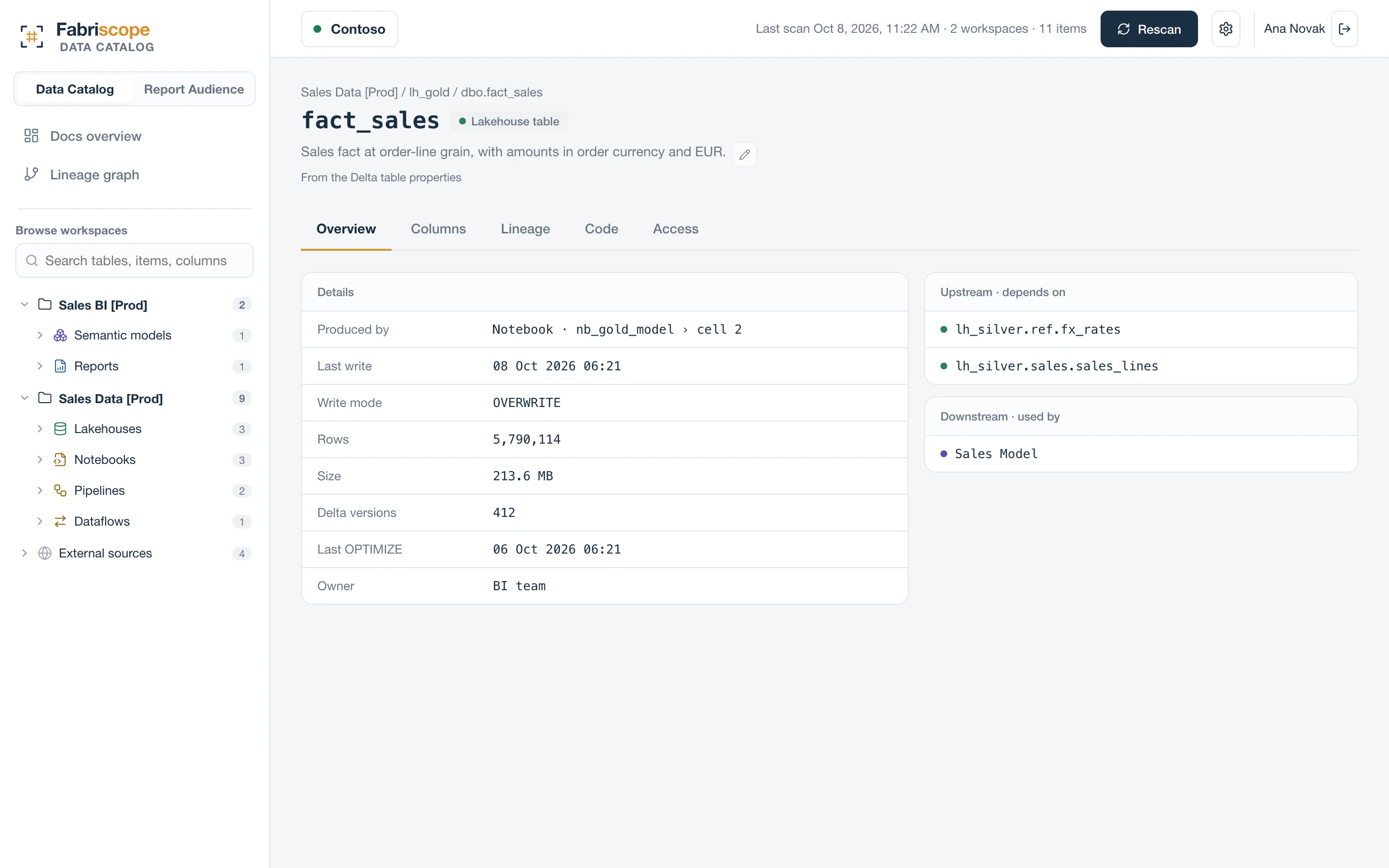
Fabriscope reads the definitions of every notebook, pipeline, dataflow, eventstream and warehouse in the workspaces you choose and parses them: PySpark and Spark SQL, T-SQL, Data Factory JSON and M. It follows %run notebooks, parameter cells, the parameters a pipeline passes, Variable Libraries and the workspace a notebook runs in, so config[env] resolves to the lakehouse it really is.
- Every lakehouse and warehouse table shows what writes it, the write mode, and the exact code, highlighted.
- Lineage runs from source systems (SQL Server, APIs, files) through every layer to semantic models and Power BI reports, across workspaces.
- What could not be resolved is listed, not hidden: a dynamic path shows up as dynamic, with the expression.
It is read-only and reads metadata only: definitions, schemas and the Delta log, never a row of your data.
Questions
Does Fabric have table-level lineage?
Fabric's lineage view and the OneLake catalog show lineage between items. Which table a notebook writes, and from which line of code, is not shown; Fabriscope derives it from the code.
Does it need Contributor?
Reading notebook, pipeline and dataflow code goes through Microsoft's getDefinition API, which requires Contributor on the workspace even though nothing is written. Fabriscope never calls a write API.